Amazon Web Services
Our Amazon Web Services (AWS) integration enables you to connect to one or more AWS accounts, providing better network coverage and access to additional information. We use this integration to discover your registered domain names, your hosted DNS zones and the associated name records, and any cloud resources. This page explains how to connect an AWS account to your Certificates account.
1. Decide which policy to use
Section titled “1. Decide which policy to use”In order to retrieve the necessary information, we require read-only access to the desired resources. There are two ways to give us the access:
- Use the built-in SecurityAudit policy (preferred) — provides read-only access to a wide range of resources in the AWS account. If you choose this option, no further action will be needed to activate new features as we add them to this integration. More information about the SecurityAudit policy and the permissions it gives can be found here.
- Use a custom policy — this option may be preferred if you want to have complete control over what resources we are able to access. Crafting a policy requires additional time and effort, as well as knowledge of how AWS works. If you choose this option, you may need to tweak your policies later as we expand our functionality.
2. Create an AWS IAM role
Section titled “2. Create an AWS IAM role”This integration requires restricted (read-only) access to your AWS account. In this step, you will create a new role in the Identity Access Management (IAM) section, then allow the Certificates AWS account to assume that role.
Configuration on the Certificates side
Section titled “Configuration on the Certificates side”- Open the Integrations page in a new tab.
- Click Add New Integration, and select AWS from the dropdown.
- Enter a unique name to identify the integration and optionally enter something into the Reference field, if you want a way of associating the integration with a particular account or similar.
At this point, on the Certificates side you will be left needing to enter the AWS Account ID. Before you do that, you will need to visit the AWS console and create a new Role there. Do this using the instructions below, and then return to the Certificates website to enter the account ID. Click Save Integration. Once saved, click Test in the integration’s actions in the table. If it succeeds, then ensure the integration is enabled and enable it otherwise using the row actions. Your new integration is now active and will run shortly.
Configuration on the AWS side
Section titled “Configuration on the AWS side”-
Log in to your AWS account, go to IAM, then Roles.
-
Click on Create role and select Another AWS account.
-
Enter your Certificates account ID as the AccountId value. This is the account belonging to Certificates which will be assuming this role. It can be copied over from the create AWS integration modal.
-
Enter the external ID supplied in the integration creation form in the Require external ID field. This must be exactly as written.
-
Click Next: Permissions then:
- If using the SecurityAudit policy, search for it in the policy list, tick the checkbox next to it, click Next: Tags, then Next: Review, then jump to step 10.
- If creating a custom policy, then click Create Policy. This will open a new tab. Now follow steps 6 to 9.
-
Click JSON then paste in one of the following policies. The first policy is the minimum needed for Certificates to get some information out of your account. The second is a snapshot in time of the SecurityAudit policy, allowing us to extract more data as we improve the integration.
Policy 1 (minimum):
{"Version": "2012-10-17","Statement": [{"Sid": "","Effect": "Allow","Resource": "*","Action": ["route53domains:List*","route53:List*"]}]}Policy 2 (SecurityAudit snapshot):
{"Version": "2012-10-17","Statement": [{"Sid": "","Effect": "Allow","Resource": "*","Action": ["access-analyzer:GetAnalyzedResource","access-analyzer:GetAnalyzer","access-analyzer:GetArchiveRule","access-analyzer:GetFinding","access-analyzer:ListAnalyzedResources","access-analyzer:ListAnalyzers","access-analyzer:ListArchiveRules","access-analyzer:ListFindings","access-analyzer:ListTagsForResource","acm:Describe*","acm:List*","application-autoscaling:Describe*","appmesh:Describe*","appmesh:List*","appsync:List*","athena:GetWorkGroup","athena:List*","autoscaling:Describe*","batch:DescribeComputeEnvironments","batch:DescribeJobDefinitions","chime:List*","cloud9:Describe*","cloud9:ListEnvironments","clouddirectory:ListDirectories","cloudformation:DescribeStack*","cloudformation:GetTemplate","cloudformation:ListStack*","cloudformation:GetStackPolicy","cloudfront:Get*","cloudfront:List*","cloudhsm:ListHapgs","cloudhsm:ListHsms","cloudhsm:ListLunaClients","cloudsearch:DescribeDomains","cloudsearch:DescribeServiceAccessPolicies","cloudsearch:DescribeDomainEndpointOptions","cloudtrail:DescribeTrails","cloudtrail:GetEventSelectors","cloudtrail:GetTrailStatus","cloudtrail:ListTags","cloudtrail:LookupEvents","cloudwatch:Describe*","cloudwatch:ListTagsForResource","codebuild:ListProjects","codecommit:BatchGetRepositories","codecommit:GetBranch","codecommit:GetObjectIdentifier","codecommit:GetRepository","codecommit:List*","codedeploy:Batch*","codedeploy:Get*","codedeploy:List*","codepipeline:ListPipelines","codestar:Describe*","codestar:List*","cognito-identity:ListIdentityPools","cognito-idp:ListUserPools","cognito-sync:Describe*","cognito-sync:List*","comprehend:Describe*","comprehend:List*","config:BatchGetAggregateResourceConfig","config:BatchGetResourceConfig","config:Deliver*","config:Describe*","config:Get*","config:List*","datapipeline:DescribeObjects","datapipeline:DescribePipelines","datapipeline:EvaluateExpression","datapipeline:GetPipelineDefinition","datapipeline:ListPipelines","datapipeline:QueryObjects","datapipeline:ValidatePipelineDefinition","datasync:Describe*","datasync:List*","dax:Describe*","dax:ListTags","detective:ListGraphs","detective:ListMembers","detective:GetGraphIngestState","directconnect:Describe*","dms:Describe*","dms:ListTagsForResource","ds:DescribeDirectories","dynamodb:DescribeContinuousBackups","dynamodb:DescribeGlobalTable","dynamodb:DescribeTable","dynamodb:DescribeTimeToLive","dynamodb:ListBackups","dynamodb:ListGlobalTables","dynamodb:ListStreams","dynamodb:ListTables","dynamodb:ListTagsOfResource","ec2:Describe*","ec2:DescribeTransitGatewayAttachments","ec2:DescribeTransitGatewayMulticastDomains","ec2:DescribeTransitGatewayPeeringAttachments","ec2:DescribeTransitGatewayRouteTables","ec2:DescribeTransitGateways","ec2:DescribeTransitGatewayVpcAttachments","ec2:GetManagedPrefixListAssociations","ec2:GetManagedPrefixListEntries","ecr:DescribeImages","ecr:DescribeRepositories","ecr:GetLifecyclePolicy","ecr:GetRepositoryPolicy","ecr:ListTagsForResource","ecs:Describe*","ecs:List*","eks:DescribeCluster","eks:DescribeNodeGroup","eks:ListClusters","eks:ListNodeGroups","elasticache:Describe*","elasticache:ListTagsForResource","elasticbeanstalk:Describe*","elasticbeanstalk:DescribeApplications","elasticbeanstalk:ListTagsForResource","elasticfilesystem:DescribeFileSystems","elasticfilesystem:DescribeMountTargetSecurityGroups","elasticfilesystem:DescribeMountTargets","elasticloadbalancing:Describe*","elasticmapreduce:Describe*","elasticmapreduce:GetBlockPublicAccessConfiguration","elasticmapreduce:ListClusters","elasticmapreduce:ListInstances","es:Describe*","es:ListDomainNames","es:ListElasticsearchInstanceTypeDetails","es:ListElasticsearchVersions","es:ListTags","events:Describe*","events:List*","events:TestEventPattern","firehose:Describe*","firehose:List*","fms:ListComplianceStatus","fms:ListPolicies","fsx:Describe*","fsx:List*","gamelift:ListBuilds","gamelift:ListFleets","glacier:DescribeVault","glacier:GetVaultAccessPolicy","glacier:ListVaults","globalaccelerator:Describe*","globalaccelerator:List*","glue:GetDataCatalogEncryptionSettings","glue:GetDevEndpoints","greengrass:List*","guardduty:DescribePublishingDestination","guardduty:Get*","guardduty:List*","iam:GenerateCredentialReport","iam:GenerateServiceLastAccessedDetails","iam:Get*","iam:List*","iam:SimulateCustomPolicy","iam:SimulatePrincipalPolicy","inspector:Describe*","inspector:Get*","inspector:List*","inspector:Preview*","iot:Describe*","iot:GetPolicy","iot:GetPolicyVersion","iot:List*","kinesis:DescribeStream","kinesis:ListStreams","kinesis:ListTagsForStream","kinesisanalytics:ListApplications","kms:Describe*","kms:Get*","kms:List*","lambda:GetAccountSettings","lambda:GetFunctionConfiguration","lambda:GetLayerVersionPolicy","lambda:GetPolicy","lambda:List*","license-manager:List*","lightsail:GetInstances","lightsail:GetLoadBalancers","logs:Describe*","logs:ListTagsLogGroup","machinelearning:DescribeMLModels","mediaconnect:Describe*","mediaconnect:List*","mediastore:GetContainerPolicy","mediastore:ListContainers","opsworks:DescribeStacks","opsworks-cm:DescribeServers","organizations:List*","organizations:Describe*","quicksight:Describe*","quicksight:List*","ram:List*","rds:Describe*","rds:DownloadDBLogFilePortion","rds:ListTagsForResource","redshift:Describe*","rekognition:Describe*","rekognition:List*","robomaker:Describe*","robomaker:List*","route53:Get*","route53:List*","route53domains:GetDomainDetail","route53domains:GetOperationDetail","route53domains:ListDomains","route53domains:ListOperations","route53domains:ListTagsForDomain","route53resolver:List*","route53resolver:Get*","s3:GetAccelerateConfiguration","s3:GetAccessPoint","s3:GetAccessPointPolicy","s3:GetAccessPointPolicyStatus","s3:GetAccountPublicAccessBlock","s3:GetAnalyticsConfiguration","s3:GetBucket*","s3:GetEncryptionConfiguration","s3:GetInventoryConfiguration","s3:GetLifecycleConfiguration","s3:GetMetricsConfiguration","s3:GetObjectAcl","s3:GetObjectVersionAcl","s3:GetReplicationConfiguration","s3:ListAccessPoints","s3:ListAllMyBuckets","sagemaker:Describe*","sagemaker:List*","sdb:DomainMetadata","sdb:ListDomains","secretsmanager:DescribeSecret","secretsmanager:GetResourcePolicy","secretsmanager:ListSecrets","secretsmanager:ListSecretVersionIds","securityhub:Describe*","securityhub:Get*","securityhub:List*","serverlessrepo:GetApplicationPolicy","serverlessrepo:List*","ses:GetIdentityDkimAttributes","ses:GetIdentityPolicies","ses:GetIdentityVerificationAttributes","ses:ListIdentities","ses:ListIdentityPolicies","ses:ListVerifiedEmailAddresses","shield:Describe*","shield:List*","snowball:ListClusters","snowball:ListJobs","sns:GetTopicAttributes","sns:ListSubscriptionsByTopic","sns:ListTagsForResource","sns:ListTopics","sqs:GetQueueAttributes","sqs:ListDeadLetterSourceQueues","sqs:ListQueues","sqs:ListQueueTags","ssm:Describe*","ssm:GetAutomationExecution","ssm:ListDocuments","ssm:ListTagsForResource","sso:DescribePermissionsPolicies","sso:List*","states:ListStateMachines","storagegateway:DescribeBandwidthRateLimit","storagegateway:DescribeCache","storagegateway:DescribeCachediSCSIVolumes","storagegateway:DescribeGatewayInformation","storagegateway:DescribeMaintenanceStartTime","storagegateway:DescribeNFSFileShares","storagegateway:DescribeSnapshotSchedule","storagegateway:DescribeStorediSCSIVolumes","storagegateway:DescribeTapeArchives","storagegateway:DescribeTapeRecoveryPoints","storagegateway:DescribeTapes","storagegateway:DescribeUploadBuffer","storagegateway:DescribeVTLDevices","storagegateway:DescribeWorkingStorage","storagegateway:List*","tag:GetResources","tag:GetTagKeys","transfer:Describe*","transfer:List*","translate:List*","trustedadvisor:Describe*","waf:GetWebACL","waf:ListWebACLs","waf:ListTagsForResource","wafv2:GetWebACL","wafv2:ListAvailableManagedRuleGroups","wafv2:ListIPSets","wafv2:ListLoggingConfigurations","wafv2:ListRegexPatternSets","wafv2:ListResourcesForWebACL","wafv2:ListRuleGroups","wafv2:ListTagsForResource","wafv2:ListWebACLs","waf-regional:GetWebACL","waf-regional:ListResourcesForWebACL","waf-regional:ListTagsForResource","waf-regional:ListWebACLs","workspaces:Describe*"]},{"Effect": "Allow","Action": ["apigateway:GET"],"Resource": ["arn:aws:apigateway:*::/apis","arn:aws:apigateway:*::/apis/*/stages","arn:aws:apigateway:*::/apis/*/stages/*","arn:aws:apigateway:*::/apis/*/routes","arn:aws:apigateway:*::/clientcertificates/*","arn:aws:apigateway:*::/restapis","arn:aws:apigateway:*::/restapis/*/authorizers","arn:aws:apigateway:*::/restapis/*/authorizers/*","arn:aws:apigateway:*::/restapis/*/documentation/versions","arn:aws:apigateway:*::/restapis/*/resources","arn:aws:apigateway:*::/restapis/*/resources/*","arn:aws:apigateway:*::/restapis/*/resources/*/methods/*","arn:aws:apigateway:*::/restapis/*/stages","arn:aws:apigateway:*::/restapis/*/stages/*","arn:aws:apigateway:*::/tags/*","arn:aws:apigateway:*::/vpclinks"]}]} -
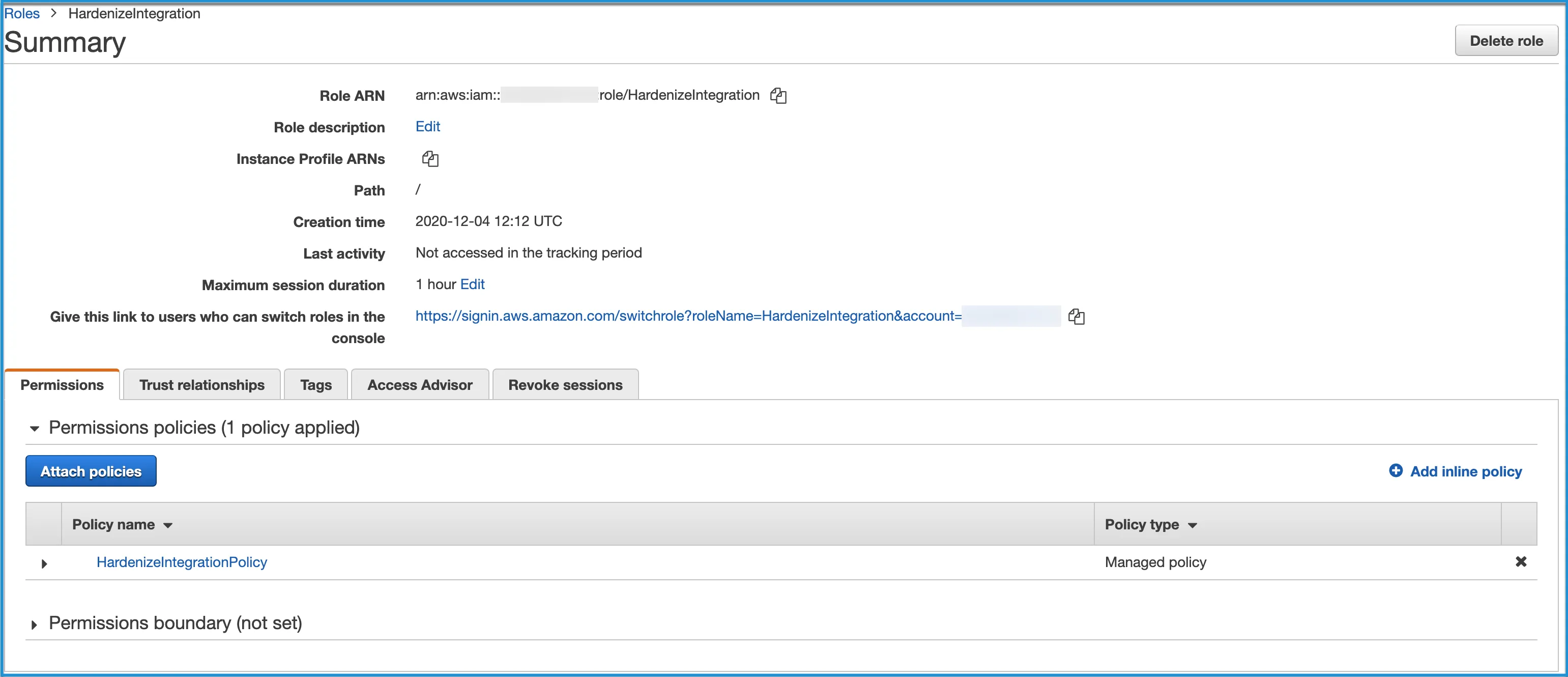
Click Review Policy, then enter the name
HardenizeIntegrationPolicy. -
Click Create Policy. Once created, close this tab and go back to the previous tab.
-
Click the Refresh button, so it will be able to find the newly created policy. Then search for and select the newly created policy. Click Next: Tags, then Next: Review.
-
Enter
HardenizeIntegrationas the role name. This must be exactly as written. -
Click Create Role then view the newly created role. It will show you a value for Role ARN. Inside that ARN, there will be a 12 digit number which is your AWS Account ID. This number is what you need to complete the configuration on the Certificates side.